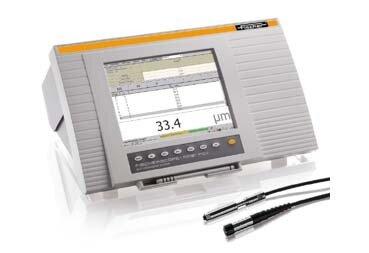
FischerScope Device
Thickness Measurement Integration

FischerScope Operator Station

Replace the outdated, complex native FischerScope interface with a modern, intuitive web-based solution. Built specifically for operators on the production floor.

70% faster data collection
Zero manual entry errors
Barcode scanner optimized

Say Goodbye to Clunky Interfaces

The native FischerScope interface is complex and error-prone. Our Operator Station eliminates confusion, reduces training time, and dramatically improves accuracy and efficiency.

Modern Interface for the Production Floor

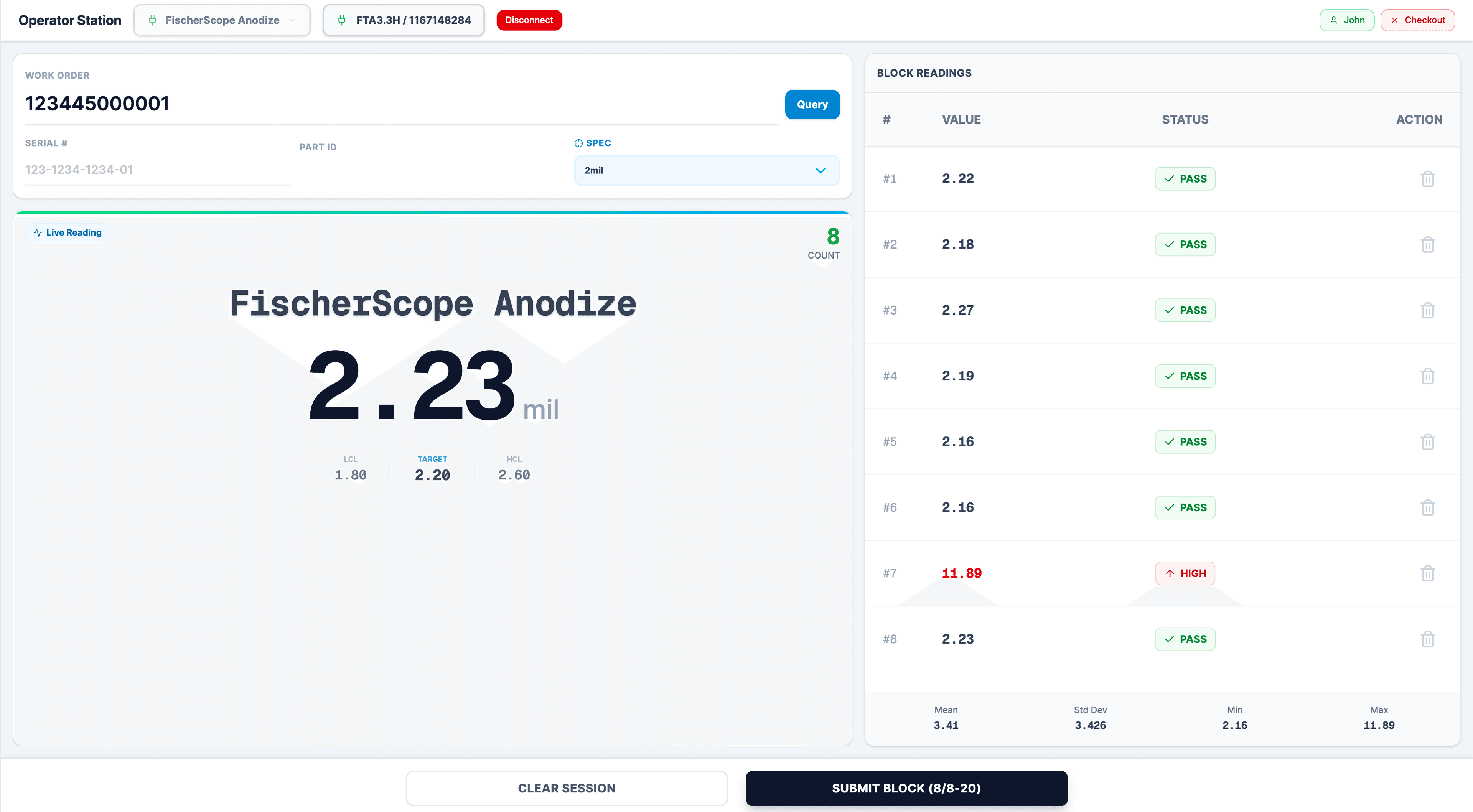
Live readings, work order tracking, and real-time quality control—all in one place

FischerScope Operator Station showing live readings, work order details, and block readings management

Key Benefits

Transform your quality control workflow with these powerful capabilities

Eliminate Human Error

Automatic Device Validation

  • Instantly verifies device connection and serial number matching
  • Validates device state before operations begin
  • Prevents data collection from wrong devices

Pre-Import Error Checking

  • Validates group separator settings automatically
  • One-click fix for common configuration issues
  • Real-time warnings prevent incomplete imports

Complete Visibility & Control

Real-Time Device Information

  • Live display of probe serial, application, and device state
  • Current block count visibility before importing
  • Instant feedback on device readiness

Progress Tracking

  • Real-time progress indicators during data collection
  • Auto-import progress across multiple applications
  • Clear completion status with measurement counts

Dramatically Improved Efficiency

Automated Batch Processing

  • Import multiple applications with a single click
  • Automatic application switching and verification
  • Skip empty applications automatically

Time Savings

  • Eliminates manual data entry completely
  • No need to navigate complex FischerScope menus
  • Automatic data parsing and formatting

Guided Work Order Flow

Barcode Scanner Optimized

  • Large, auto-focused input fields for scanning
  • Instant validation as you scan—no waiting
  • Automatic barcode format handling

Smart Serial Number Validation

  • Only valid serial numbers for work order accepted
  • Prevents scanning wrong parts instantly
  • Warns if serial number already measured

Simple Guided Workflow

Five easy steps from connection to submission

1

Connect

Select your serial port and connect to the FischerScope device. The system automatically detects and validates the device.

2

Enter Work Order

Scan or enter the work order barcode. The system automatically queries and retrieves valid serial numbers and part information.

3

Scan Serial Number

Use your barcode scanner to scan the part serial number. The system validates it against the work order and prevents errors instantly.

4

Measure

Take measurements with the FischerScope device. All measurements are automatically associated with the correct work order, serial, and part.

5

Submit

Review and submit measurements directly to your quality control system with complete traceability.

Customer Impact

Real benefits for every role in your organization

For Operators

  • 70% Faster

    Reduce data collection time with barcode scanning

  • Easier to Use

    Intuitive interface requires minimal training

  • Error-Free

    Guided workflow prevents scanning wrong parts

For Quality Managers

  • More Accurate

    Eliminate manual entry errors completely

  • Better Traceability

    Complete audit trail of all measurements

  • Faster Reporting

    Direct integration with QC system

For Production Teams

  • Less Downtime

    Faster data collection means less interruption

  • Fewer Errors

    Automated validation prevents quality issues

  • Better Visibility

    Real-time status of measurement operations

Old vs. New

See the difference that modern technology makes

Traditional FischerScope Interface

  • Complex menu navigation
  • Manual configuration checking
  • Manual data entry
  • Manual work order/serial entry
  • No serial number validation
  • Error-prone setup
  • Limited visibility
  • Time-consuming workflows
  • No integration
  • Requires extensive training

FischerScope Operator Station

  • Simple, intuitive web interface
  • Automatic validation
  • Automated import and parsing
  • Guided workflow with barcode scanner
  • Automatic validation against work order
  • Built-in error prevention
  • Real-time status and progress
  • Streamlined, efficient process
  • Direct QC system integration
  • Self-explanatory interface

Technical Advantages

Built with modern web technology for reliability and ease of use

Modern Web Technology

  • No software installation required
  • Works on Chrome, Edge, Opera
  • Cross-platform compatibility
  • Always up-to-date with latest features

Robust Error Handling

  • Comprehensive validation at every step
  • Clear error messages with solutions
  • Automatic recovery from common issues
  • Prevents data loss through validation

Seamless Integration

  • Direct integration with QC system
  • Automatic device and parameter matching
  • Batch measurement submission
  • Complete audit trail

Everything You Need

Guided Work Order → Serial Number → Part Number workflow
Barcode scanner optimized with auto-focus
Automatic work order data retrieval
Smart serial number validation
Automatic device validation
Pre-import error checking
Real-time progress tracking
Batch processing capabilities
One-click configuration fixes
Direct QC system integration
Complete data visibility
Error prevention at every step

Transform Your FischerScope Operations

Experience the difference that modern technology makes in your quality control operations.

FischerScope Operator Station | BrixIQ | BrixIQ